Our offices will be shut from close of business on Tuesday 23rd December 2025 until Monday 5th January 2026. Between these dates only credit card payments for ReFH 2 and WINFAP 5 will be dispatched, all other orders will go out in the new year. We will be providing limited software support on Monday 22nd and Tuesday 23rd December and the last posting date for LowFlows 2 dongles will be Thursday 18th December until Monday 5th January.
**Wishing you a very Merry Christmas and Happy New Year** :christmas_tree:
Our offices will be shut from close of business on Tuesday 23rd December 2025 until Monday 5th January 2026. Between these dates only credit card payments for ReFH 2 and WINFAP 5 will be dispatched, all other orders will go out in the new year. We will be providing limited software support on Monday 22nd and Tuesday 23rd December and the last posting date for LowFlows 2 dongles will be Thursday 18th December until Monday 5th January.
**Wishing you a very Merry Christmas and Happy New Year** :christmas_tree:

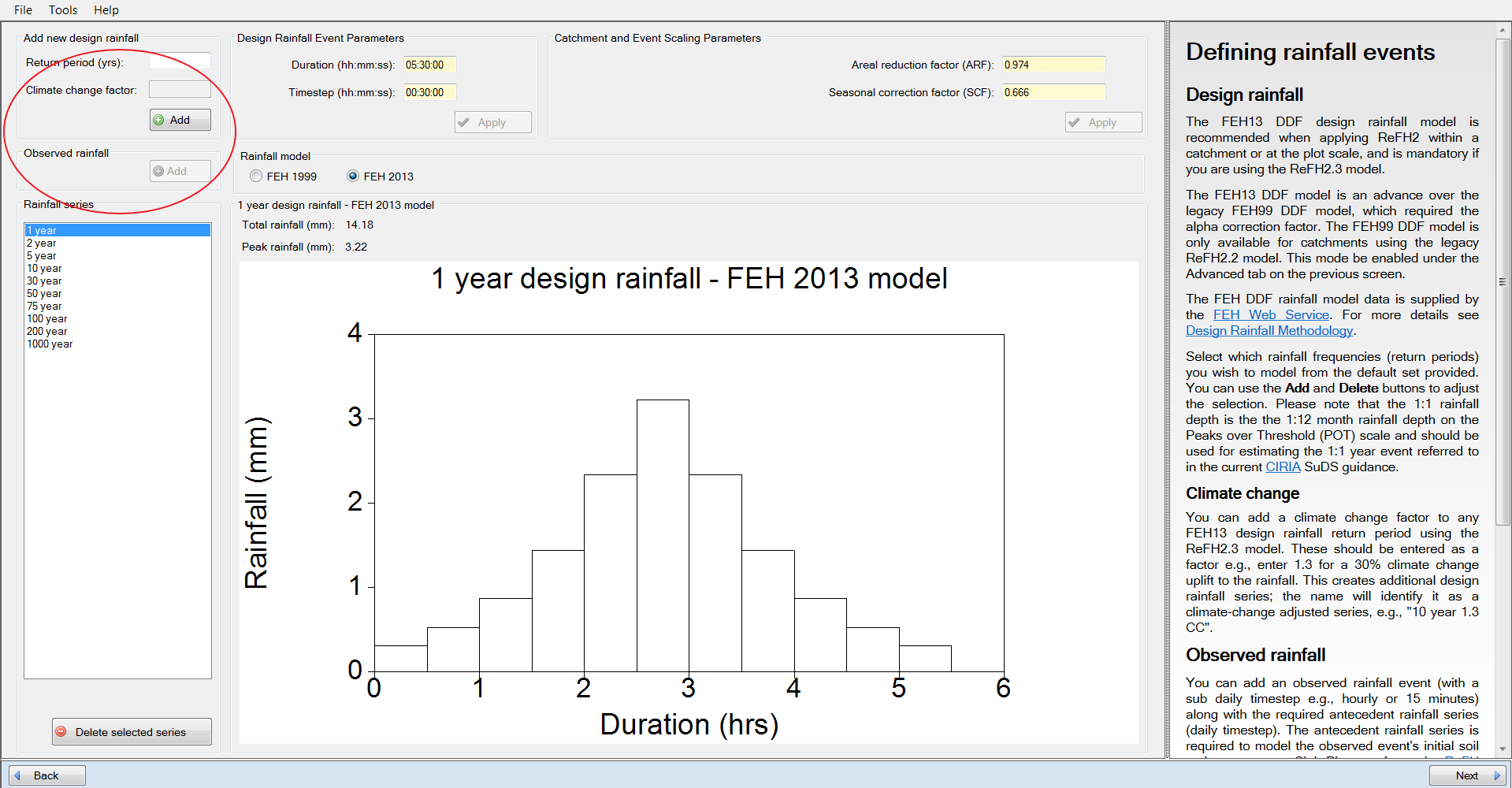
Why are the climate change factor and observed rainfall buttons greyed out?

ReFH 2 supports two internal modelling engines: one that provides backwards compatibility with ReFH 2.2 (“the ReFH 2.2 model”) and one with the latest model engine and new features, such as observed rainfall and climate change factor modelling (“the ReFH 2.3 model”).

The climate change and observed events are only available for the ReFH 2.3 model. To use this model you will need to import the latest version of the FEH Web Service catchment or point XML files. Please see How do I enable the ReFH2.3 Model?

If you load an earlier version XML file (pre-November 2019), or an existing project saved in the ReFH 2.2 software, ReFH 2 will only run the ReFH 2.2 model. The climate change factor and observed rainfall buttons are therefore greyed out:
A project using the ReFH 2.2 model cannot be converted to the ReFH 2.3 model. Simply start a new project and load an updated descriptor XML file.